MIvoter: Manual Entry of County Election Data
Charles Roth
Last update: 2/6/2026
I. Introduction and Purpose
The primary goal of
MIvoter.org
is to encourage more people to vote for Democratically-endorsed candidates
(especially in "non-partisan" elections).
Secondarily, we provide contact & other information about all of
each voter's elected officials -- from top to bottom, Governor to (metaphorical) dog-catcher.
There is no central database of all elected officials in Michigan.
So -- we're building it!
(This information is also really useful come election time.
It means we know which offices will have elections -- and which previous races
were won by how many votes.
This is extremely useful strategic information for the Democratic party as a whole.)
In order to do this, we are "scraping" the data from each county's election results site(s).
Most of this is automated; we have a small pool of volunteers writing software to parse and import
the (many different formats of) county election data.
We already have 60+% of the data automatically imported, with more to come.
However... (and this is the part where you come in) some of these reports are (a) difficult to
automatically parse, and (b) small.
Such as an odd-numbered year election that had a single contest.
In these cases, we're looking for a few volunteers to
manually enter the data.
II. The data we want
We are gathering the data for each general (November) election,
for the years 2020 - 2025,
for each of the 83 Michigan counties. That's about 500 files, total.
For each contest (aka race), we want to end up
with a spreadsheet that looks like the below.
(The fields are actually separated by tab characters -- the 'tab' key on your keyboard,
shown here as 'large' spaces.)
yyyy-mm-dd county# title voteFor# candidateName partyName #votes
where
- yyyy-mm-dd is the date of the election
- county# is the county number. (See table below)
- title is the name of the office
- voteFor# is the number of people on the ballot that a voter should vote for
(often just 1, but for some races, e.g. board of education, it may be several)
- candidateName is the full name of the candidate
- partyName any form of the party name, e.g. Democratic, D, DEM, Non-partisan, Write-in, whatever.
- #votes the number of votes that candidate got.
Notes:
- We want only candidate races.
We ignore proposals, referenda, millages, etc.
- We want only county-level offices or lower (cities, townships, villages, school boards,
community college boards).
We ignore state offices, including state house and senate (we already have that data from a single source).
We ignore all judicial offices as well (already have that data).
- If there were 3 candidates in a contest, we want the data for all 3, not just the winner.
- If there were write-in candidates or numbers, ignore them unless they (a) actually won,
or (b) are a substantial fraction of the total votes (say 20%). It's rare, but it happens occasionally.
- A "tab-separated spreadsheet" is sometimes known as "CSV" or "TSV".
You can use any spreadsheet tool (Excel, OpenOffice, etc.), and just tell
it to save the file as a CSV or TSV, with tabs as the separator (not commas).
III. The data we have
Here's an example of a small-but-hard-to-parse election report:
Alger County Nov 7, 2023.
The relevant part looks like this:
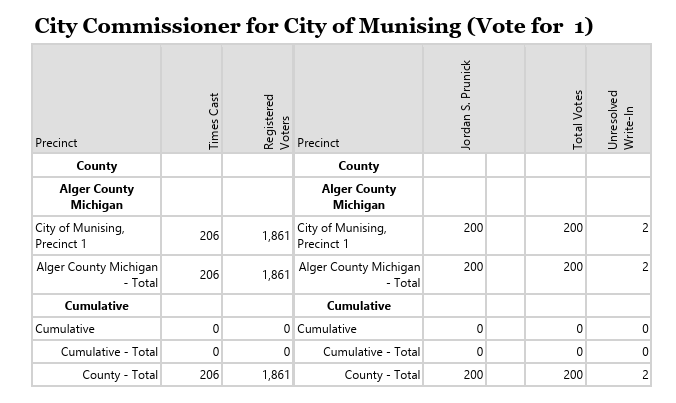 There's a lot of stuff in the above.
What we're looking for is
There's a lot of stuff in the above.
What we're looking for is
- The office title (at the top, "City Commissioner for City of Munising").
- The "vote for" number (at the top, just the number).
If it's not shown, assume "1".
(On rare occasions, some reports will explicitly indicate the winners, perhaps
in bold-face. In that case the "vote for" number is the number of winners!)
- The candidate name (in this case "sideways" at the top, Jordan S. Prunick).
- The party name, if any (or else "?").
- The total votes, county wide, for that candidate (follow the column
under the candidate name, to the very bottom).
Everything else is irrelvant!
So the idea is to translate the above into a spreadsheet, like this:
#yyyy-mm-dd  county#   title                                   voteFor#   candidateName     partyName   #votes
2023-11-07         2   City Commissioner for City of Munising    1        Jordan S. Prunick        ?     200
The first row just shows the field or column names, and the "#" at the start means this is a 'comment' line, which
will be ignored by our software.
The second line is the actual data for the (in this case one) candidate.
(When you save the data as a CSV/TSV file, the fields are separated by the 'tab' character.)
Make sure to enter one complete row per candidate.
We want all of the candidates, not just the winner.
(Write-ins should be ignored, unless they have a substantial number of votes -- say 20% or more.)
That's it! This contest has only 1 person, but if there were more, each candidate would
get their own row.
IV. How to Do It
You can download a template spreadsheet, that
has (just) the first comment line with the field names, and use that to start with.
The files that we need to manually enter are listed at
manual-list.
Start by emailing Charles,
who will then give you access to it.
Then pick one, put your name and date in the spreadsheet (so that no-one else picks it),
download the PDF file, and have at it!
When you're done, save it as a TSV (aka CSV, but tab-separated) file.
Give the file a very specific name, that includes the county name and the year,
e.g. alger-2023.
(Please don't put spaces in the filename.)
Email the result to Charles.
V. County Numbers
(The name of the file that you download starts with the county number -- but here's the whole list,
just in case.)
| 1 | ALCONA | 29 | GRATIOT | 57 | MISSAUKEE |
| 2 | ALGER | 30 | HILLSDALE | 58 | MONROE |
| 3 | ALLEGAN | 31 | HOUGHTON | 59 | MONTCALM |
| 4 | ALPENA | 32 | HURON | 60 | MONTMORENCY |
| 5 | ANTRIM | 33 | INGHAM | 61 | MUSKEGON |
| 6 | ARENAC | 34 | IONIA | 62 | NEWAYGO |
| 7 | BARAGA | 35 | IOSCO | 63 | OAKLAND |
| 8 | BARRY | 36 | IRON | 64 | OCEANA |
| 9 | BAY | 37 | ISABELLA | 65 | OGEMAW |
| 10 | BENZIE | 38 | JACKSON | 66 | ONTONAGON |
| 11 | BERRIEN | 39 | KALAMAZOO | 67 | OSCEOLA |
| 12 | BRANCH | 40 | KALKASKA | 68 | OSCODA |
| 13 | CALHOUN | 41 | KENT | 69 | OTSEGO |
| 14 | CASS | 42 | KEWEENAW | 70 | OTTAWA |
| 15 | CHARLEVOIX | 43 | LAKE | 71 | PRESQUE ISLE |
| 16 | CHEBOYGAN | 44 | LAPEER | 72 | ROSCOMMON |
| 17 | CHIPPEWA | 45 | LEELANAU | 73 | SAGINAW |
| 18 | CLARE | 46 | LENAWEE | 74 | ST CLAIR |
| 19 | CLINTON | 47 | LIVINGSTON | 75 | ST JOSEPH |
| 20 | CRAWFORD | 48 | LUCE | 76 | SANILAC |
| 21 | DELTA | 49 | MACKINAC | 77 | SCHOOLCRAFT |
| 22 | DICKINSON | 50 | MACOMB | 78 | SHIAWASSEE |
| 23 | EATON | 51 | MANISTEE | 79 | TUSCOLA |
| 24 | EMMET | 52 | MARQUETTE | 80 | VAN BUREN |
| 25 | GENESEE | 53 | MASON | 81 | WASHTENAW |
| 26 | GLADWIN | 54 | MECOSTA | 82 | WAYNE |
| 27 | GOGEBIC | 55 | MENOMINEE | 83 | WEXFORD |
| 28 | GRAND TRAVERSE | 56 | MIDLAND |