MIvoter: County Election data volunteer guide
Charles Roth
Last update: 11/14/2025
I. Introduction and Purpose
The primary goal of MIvoter.org is to encourage more people to vote for Democratically-endorsed candidates
(especially in "non-partisan" elections).
Secondarily, we provide contact & other information about all of
each voter's elected officials -- from top to bottom, Governor to (metaphorical) dog-catcher.
There is no central database of all elected officials in Michigan.
So -- we're building it!
But this database is important for many reasons:
- Voter information. We want all Michigan voters to have an easy
way to identify, and contact, their specific elected officials.
- Voter visits. The more reasons voters have to visit MIvoter,
and the more positive experiences that they have with the site, the
better for us, especially come election time.
- State & County party cachet. The more complete our data,
the more respect (and publicity!) we get from the state and county Democratic
parties.
(And other progressive organizations, as well.)
- Open Election seats.
A complete database, including term length and term "cycle"
(which year a given official was elected), automatically tells
us which seats are open in the next election.
- Election tallies. A complete database also tells us
(and the state & county parties, and future candidates) which races
were won by how many votes.
A simple query can tell us, for example, which races were won or lost by (say) 5% or less.
This has obvious strategic advantages.
We are building this database from the election results reports,
published by each of the 83 counties in Michigan.
We have built software to automatically read the data from those reports --
but the very first step is finding them.
That's where you come in.
As the old joke goes: "Why did Confucious hire 5 electricians?"
Because "many hands make light work."
II. Spreadsheet of election report URLs
We maintain a
master spreadsheet organized by county and year, of the election report URLs.
The goal is to add the URL for the November general election summary for every county, for every year,
between 2020 and 2025 (including the odd-numbered years).
If you are interested, you will be assigned either a specific county, or a range of counties.
(Remember that multiple people may be editing this simultaneously; as long as we
are working with different counties, there should be no problems.)
Some of this data has been filled-in, but it's spotty. For your county(ies),
add new rows as needed to cover the complete range of years.
You should already have edit access to this sheet; if not, contact
Charles Roth.
In the meantime, you can see this single-row example.
We are focused on the November general elections for each year.
Yes, there are some elections at other times of the year, but for now, the
November elections give us 99% of what we need.
III. Details
- County info. Each row must have the county name, population, and code (county #).
Usually you can just duplicate these fields from an already-existing row.
- You. Select your first name and last initial in the "Volunteer" column.
Do this right away, so we know that you are "claiming" this county and year.
- Year. This column is just the election year, since we're only collecting November election
data at this point.
So for each county, you should end up with 6 rows, one for each year.
(2025 results may not yet be published; we can work without them if necessary.)
- Where to start.
The Michigan Secretary of State publishes the
entry point to all of the county election data.
Start there, and then drill down into specific years and reports.
- Finding the data.
Each county's website is different; you may have to wander a little bit to find each specific year.
Note that we want the summary report, not the details by precinct.
(Warning: some counties provide both reports -- and they can be confusing.
Look for the one that really has the totals across the entire county.)
In most cases, we only want the URL of the report -- unless the instructions
(below) say otherwise, don't download the data, just give
us the URL.
(For some pages, you can copy-paste the URL right out of your browser's address bar
at the top, and then paste it into the proper cell in the master spreadsheet.
But some are tricky, e.g. see the directions for getting the URLs of PDFs in the sections
below.)
Different counties publish the results in different formats:
- Anything with "enhancedvoting.com" in the URL is excellent.
Those sites let us download raw data in JSON format, which is easy to import into our database.
Finding and downloading the JSON is a little bit tricky. Once you
have the county name, as known by enhancedvoting.com, you can go to an overview
page of all of the elections (or at least all of the elections since the
county started using enhancedvoting). For example, see:
app.enhancedvoting.com/results/public/berrien-county-mi
From there, follow the link to the specific election.
Then scroll all the way down -- this may take a bit, as many of
these pages dynamically generate text as you keep scrolling.
At the very bottom of the page you'll see a link that says
"Media Export". Click on that, and it should automatically
download a JSON file.
Email that to Charles,
making sure to note which county it was from.
(Unfortunately, the names of JSON files vary wildly, so it's
tricky to automate this. We're working on a way...)
- Similarly, anything with "clarityelections.com" also lets us download raw data as a CSV.
- Some counties (e.g. Washtenaw) produce an HTML page with rows and columns.
There is no standard for these, each county typically invents its own wheel (grr).
But at least these are parseable by our software, with a little bit of work.
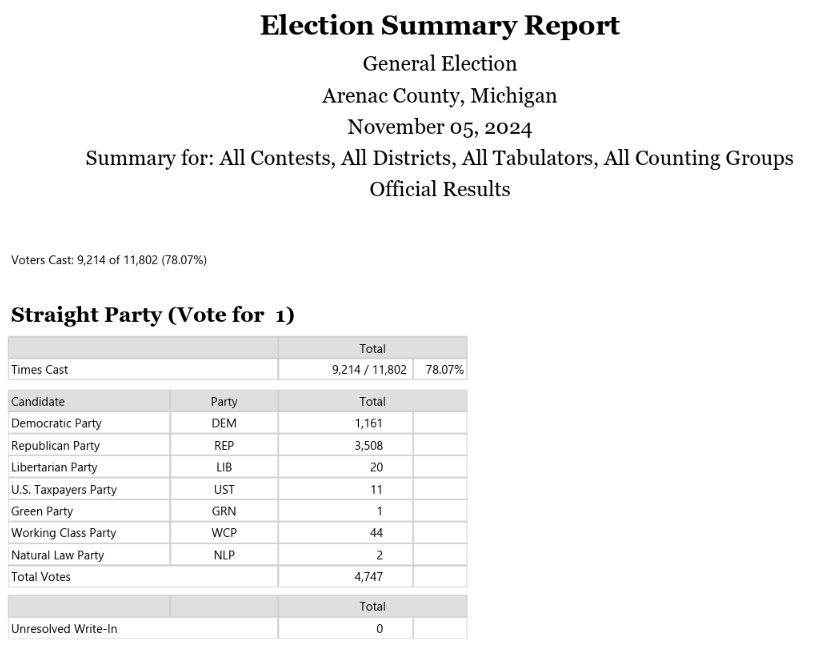
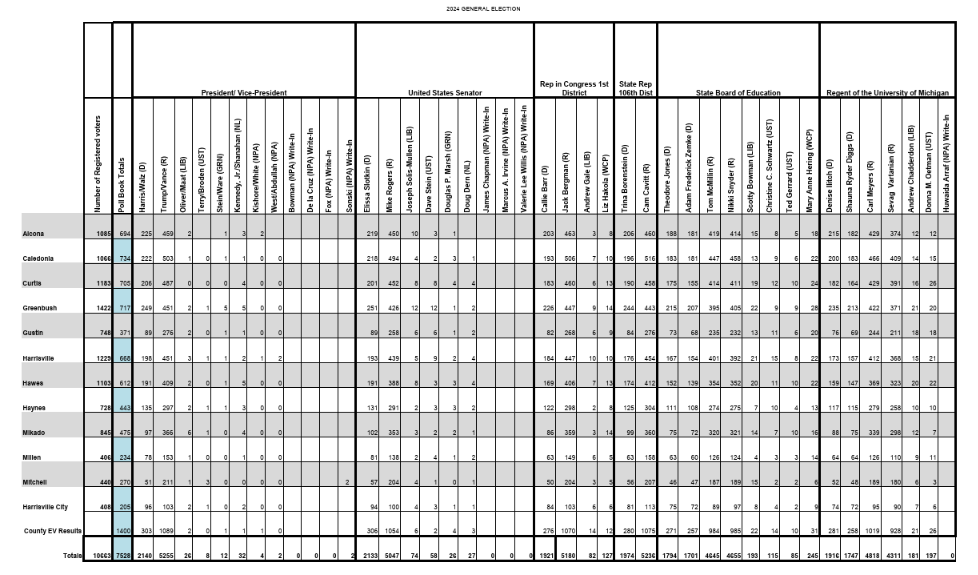
- Last, worst, and most common, are PDF pages.
The good news is that there is a way for us to extract row/column "metadata" from these
PDFs, converting them to HTML. The bad news is that there are about 5 different
PDF layouts in use, across all of these counties.
Try to determine which PDF layout is in use for a particular county and year.
We've given them names, which appear in the "Notes" column.
Here's what we have so far (click on each to expand):
| summary1 |
sideways1 |
 |
 |
If it doesn't look like any of these, define a new format, name it,
and contact Charles.
We'll add it to this documentation.
- Enter the URL.
Copy the URL of the specific page or PDF, into the "URL" field.
For PDFs, this can be tricky.
- Once you are viewing the PDF, look at your browser's address bar.
If you see something weird like "chrome-extension://blahblahblah...",
go back to the previous page, hover over the link to the PDF, right-click
and select "copy link".
Paste that into the field in our spreadsheet.
- On the other hand, if you see the PDF, but the address bar URL didn't change... or if
you see the PDF embedded in the middle of other stuff... the county's page may be
"hiding" the actual PDF URL.
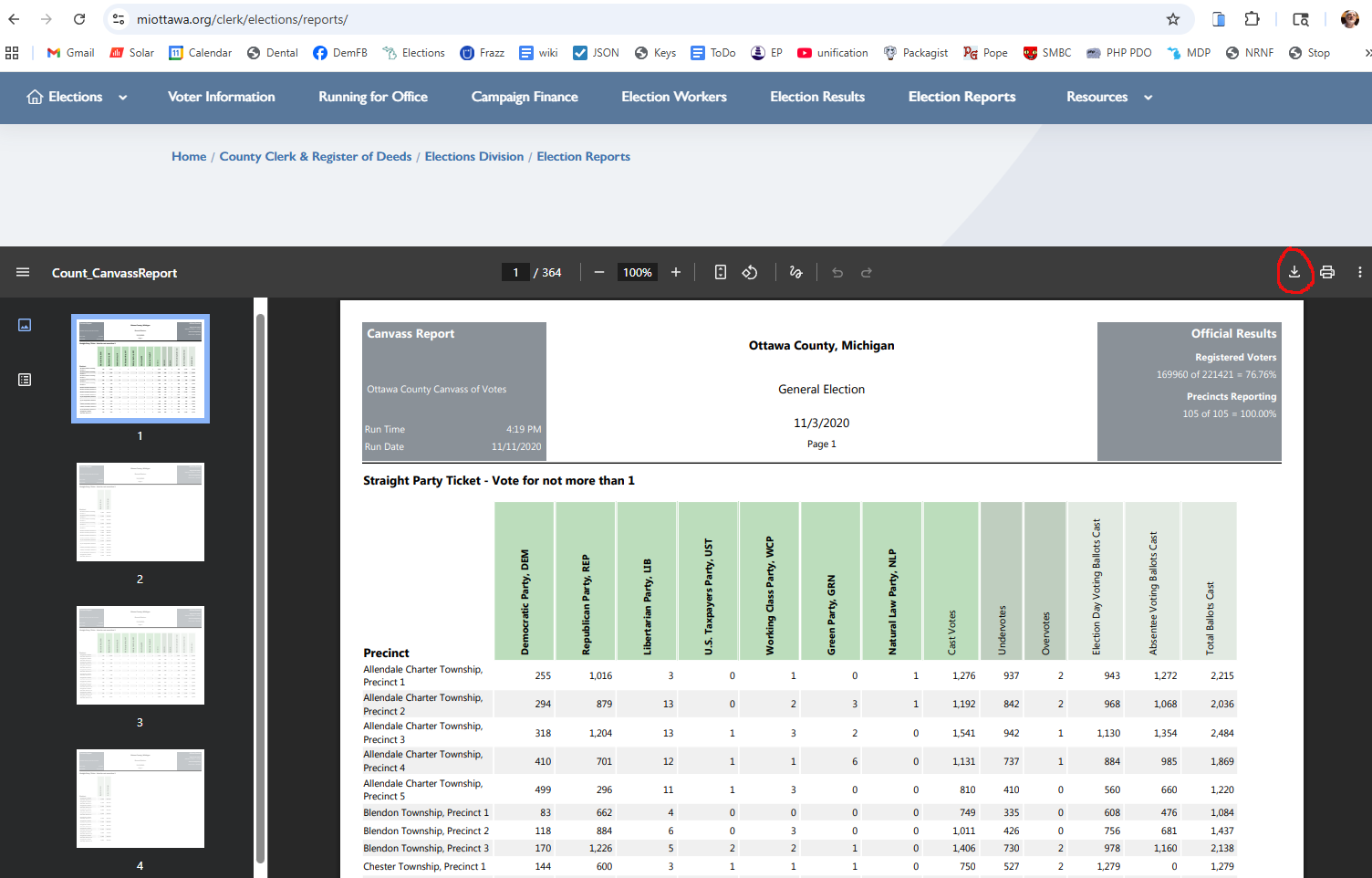
(See this example.)
In that case, look for a "download" link for the PDF itself.
(In the example, we drew a red circle around it.)
Click on that link to download the PDF to your laptop.
Save the file with a meaningful name (including county and election year),
and email it to Charles Roth.
We'll take care of putting it in a place with a known URL.
IV. Notes
- County and below.
We're only interested in offices at the county and below levels.
The President, state house & senate etc. data are irrelevant.
Normally this doesn't matter to you; but sometimes we see PDFs that have one
layout for top offices (President etc.) and a different layout for county level
and below.
This doesn't change what you do, except possibly in trying to guess the PDF
layout format.
- Ignore Status. Ignore the "Status" field; that relates to the
software parsing of the data.
- Don't change URLs.
If you click on a URL in the spreadsheet, sometimes Google "helpfully" suggests
changing the field to the title of the page at that URL.
Don't let it do that.